
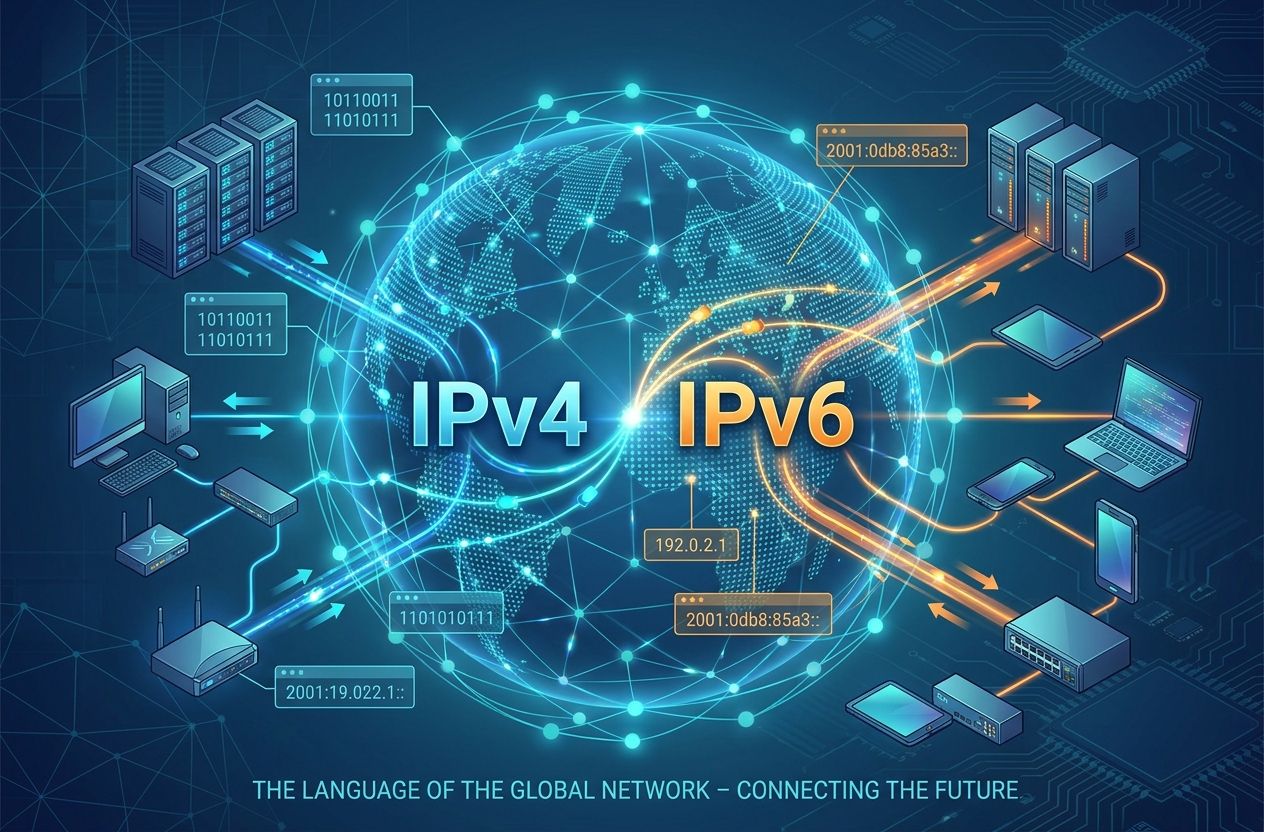
Internet Protocol is the fundamental set of rules that enables devices to find and communicate with each other across interconnected networks. In this article you will learn the historical context, technical evolution, main addressing schemes, and practical implications — from local network addresses to privacy techniques like VPNs and Tor.
A brief history of the Internet Protocol
The development of what we now call the Internet Protocol began in the late 1960s and early 1970s as part of research funded by the United States Department of Defense. The ARPANET project demonstrated packet switching, and researchers quickly realized the need for a standard protocol to route packets across heterogeneous networks.
Key milestones
- 1974: Vint Cerf and Bob Kahn published the seminal paper “A Protocol for Packet Network Intercommunication,” laying the conceptual foundation for TCP/IP.
- 1981: Early specifications for the protocol suite emerged; RFCs (Request for Comments) began to formalize behaviors.
- 1983: ARPANET adopted TCP/IP as its standard, a decisive step in the formation of the modern Internet.
- 1990s: The explosive growth of the Internet revealed limitations in the original IP addressing scheme, motivating work on extensions and eventually IPv6.
- 1998: IPv6 was standardized (RFC 2460), addressing long-term scaling and feature needs.
Today the Internet depends on a family of protocols commonly referred to as TCP/IP, where the Internet Protocol handles addressing and routing, while TCP provides reliable transport when needed.
What is the Internet Protocol and how does it work?
The Internet Protocol (IP) is a network layer protocol responsible for packetizing data, addressing hosts, and forwarding packets between networks. An IP packet contains a header with addressing and control fields and a payload that carries higher-layer data (like TCP or UDP segments).
Fundamental responsibilities of IP
- Addressing: Assigns numerical identifiers (IP addresses) to interfaces.
- Fragmentation and reassembly: Splits packets to accommodate differing MTU sizes across networks.
- Routing: Determines the path a packet follows from source to destination using routing tables and protocols.
- Best-effort delivery: IP does not guarantee delivery, ordering, or protection from duplication — those are provided by transport protocols if required.
IPv4 vs. IPv6: evolution and differences
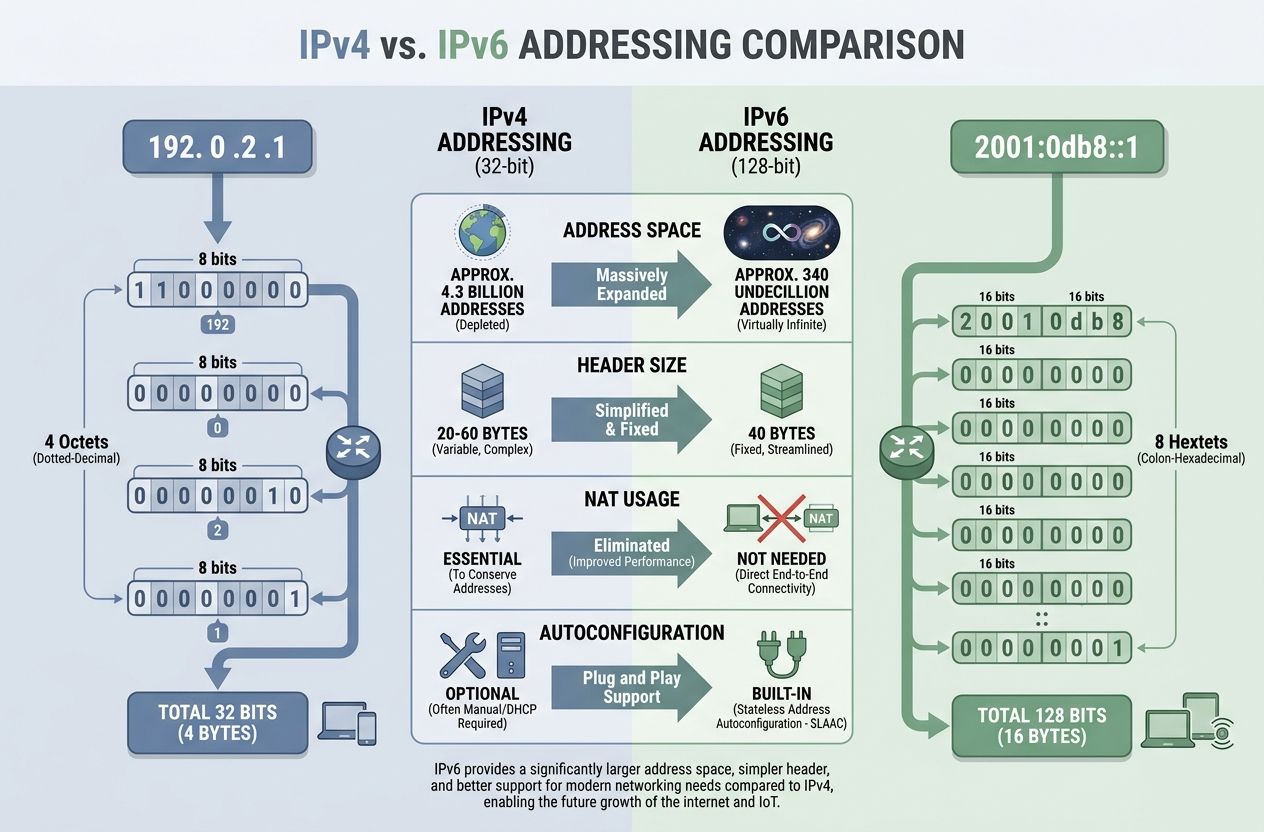
The two main versions in widespread discussion are IPv4 and IPv6. Both implement the core functions of the Internet Protocol, but they differ substantially in address space, header structure, and features.
IPv4 (Internet Protocol version 4)
- Address format: 32-bit numeric address (e.g., 192.0.2.1), written in dotted-decimal notation.
- Address space: ~4.3 billion addresses, which proved insufficient as the Internet scaled.
- Header: Variable, minimal options; designed for simplicity and compatibility with early networks.
- Common techniques: Classful addressing originally (Class A/B/C), later replaced by CIDR (Classless Inter-Domain Routing) to improve allocation efficiency. NAT (Network Address Translation) became widespread to conserve public addresses.
IPv6 (Internet Protocol version 6)
- Address format: 128-bit address (e.g., 2001:0db8:85a3::8a2e:0370:7334) expressed in hexadecimal with colon separators.
- Address space: Vastly larger (approx. 3.4×10^38 addresses), effectively solving address scarcity.
- Improved header: Simplified fixed header for efficient processing; extension headers used when needed.
- Built-in features: Mandatory support for IPsec (originally), better multicast handling, stateless address autoconfiguration (SLAAC), and elimination of the need for NAT in most deployments.
Why IPv6 adoption matters
IPv6 resolves address exhaustion and enables direct end-to-end addressing for devices — beneficial for peer-to-peer applications, IoT, and modern service architectures. Adoption has been gradual due to legacy systems, operational complexity, and compatibility concerns. Operators often run dual-stack environments supporting both IPv4 and IPv6.
Types of IP addressing
Understanding how addresses are classified helps network planning and troubleshooting. Key categories include:
Public vs Private addresses
- Public IP addresses: Routable on the global Internet and assigned by regional registries (IANA → RIRs → ISPs).
- Private IP addresses: Defined ranges meant for local networks and not routed on the public Internet (e.g., IPv4 private ranges 10.0.0.0/8, 172.16.0.0/12, 192.168.0.0/16). IPv6 has unique local addresses (fc00::/7) for similar purposes.
Static vs Dynamic
- Static IPs: Manually assigned and consistent — used for servers and infrastructure.
- Dynamic IPs: Assigned by DHCP (IPv4) or DHCPv6 / SLAAC (IPv6) — common for client devices.
Unicast, multicast, and broadcast
- Unicast: One-to-one addressing, the most common form.
- Multicast: One-to-many communication targeted to subscribers of a multicast group.
- Broadcast: One-to-all on a broadcast domain (IPv4); IPv6 replaces broadcast with multicast equivalents.
Special addresses
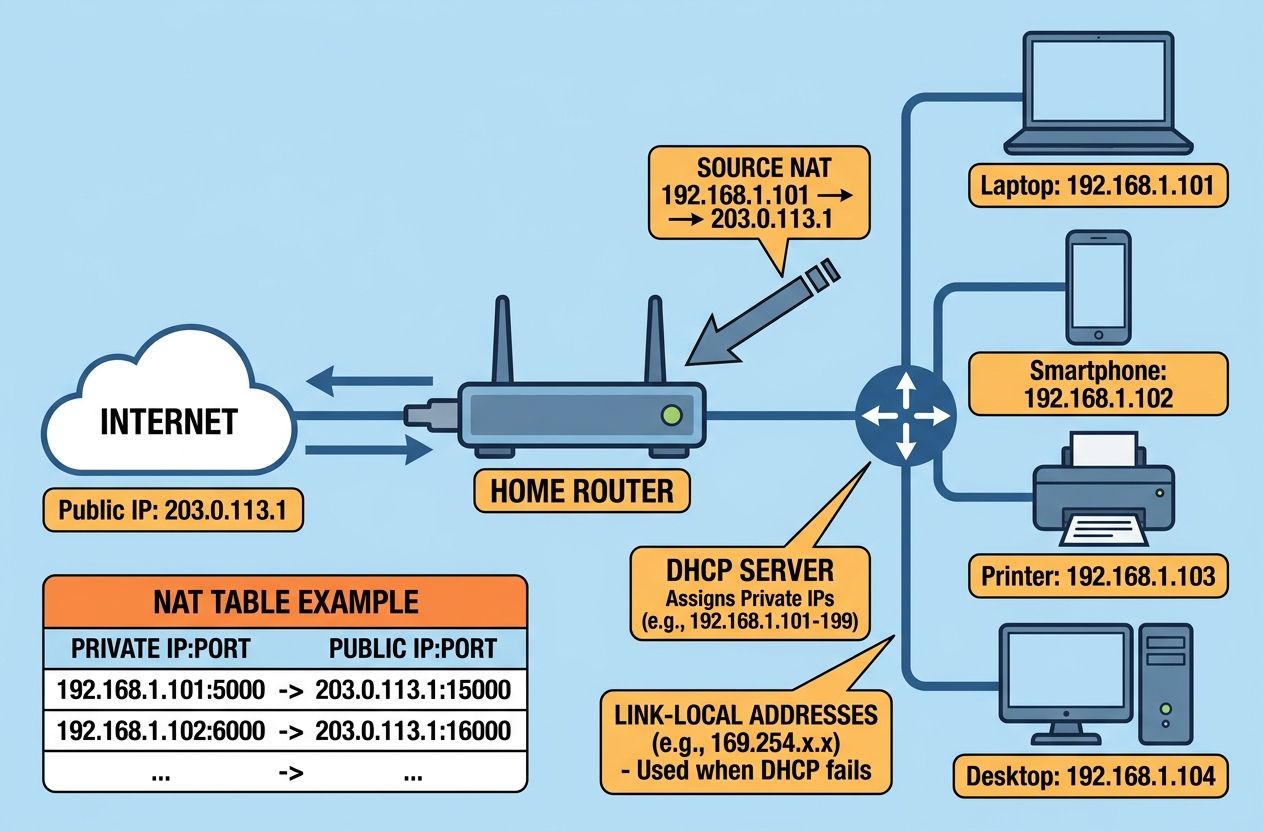
Examples: loopback (127.0.0.1 for IPv4, ::1 for IPv6), unspecified addresses (0.0.0.0 / ::), link-local addresses (169.254.0.0/16 for IPv4 APIPA, fe80::/10 for IPv6).
IP on local networks: how a device gets and uses an IP
On a LAN, devices typically obtain an IP address via DHCP or autoconfiguration. The local router maintains a routing table and forwards traffic to upstream networks or the internet. For many small networks, a single public IPv4 address is shared among many devices using NAT, which rewrites source addresses and ports to enable multiple hosts to communicate through one public address.
Why NAT became common
NAT conserves scarce IPv4 addresses and provides a basic layer of address isolation for internal devices. However, NAT complicates certain protocols, peer-to-peer connections, and end-to-end security models, which is one reason IPv6 aims to reduce reliance on NAT.
Techniques to hide or mask an IP address
There are several legitimate and privacy-oriented methods to obscure or change the apparent source IP address:
- VPN (Virtual Private Network): Encrypts traffic and routes it through a VPN provider’s server. The destination sees the VPN server’s IP instead of the client’s public IP. Good for privacy and secure remote access.
- Proxy server: Acts as an intermediary; the web server sees the proxy IP. Proxies may or may not encrypt traffic.
- Tor (The Onion Router): Routes traffic through multiple volunteer nodes with layered encryption to provide strong anonymity, at the cost of latency.
- CGNAT (Carrier-Grade NAT): Some ISPs use CGNAT which assigns private or shared addresses to users, so the public IP becomes the ISP gateway rather than the individual customer.
Each approach has trade-offs in performance, security, and anonymity. VPNs hide your public IP from destination servers and observers on your ISP network (assuming a trusted VPN), while Tor aims for stronger anonymity against many adversaries but is slower.
Can you find geolocation or other information from an IP?
Yes, an IP address can often provide coarse geolocation information (country, region, city) derived from registry allocations and ISP routing. However, accuracy varies and can be wrong or imprecise, especially for mobile and routed addresses.
What IP-based geolocation can reveal
- Country and region: Usually reliable.
- City-level accuracy: Variable; sometimes inaccurate by tens of kilometers or more.
- ISP and organization: Public registries (WHOIS, RIR databases) can show the entity to which the address block is allocated.
Geolocation does not reveal a precise physical address in most cases. For high-accuracy location, other signals (GPS, Wi-Fi triangulation) are needed. Legal processes and cooperation with ISPs can correlate an IP with a subscriber, but that is beyond casual lookup.
Brief comparison: VPN, Tor and Proxy in relation to IP
- VPN: Changes the visible public IP and encrypts traffic. Trust depends on the VPN provider’s policies and logs.
- Proxy: Alters the IP seen by destinations but may not encrypt; suitable for simple traffic redirection.
- Tor: Maximizes anonymity by hiding both origin IP and traffic patterns from endpoints, but performance and some services (e.g., streaming) may block Tor exit nodes.
Operational considerations and best practices
For network administrators and IT professionals, understanding IP principles supports effective design and troubleshooting. Practical tips:
- Plan addressing with future growth in mind — use appropriate subnet sizing and CIDR aggregation.
- Use RFC-compliant addressing and document static allocations.
- Prefer IPv6 where feasible, and run dual-stack during transition periods.
- Secure management interfaces and avoid exposing critical services directly to the public Internet without appropriate controls (firewalls, VPNs, access lists).
- Monitor routing (BGP best practices for operators) and avoid prefix leaks.
Tools and references
Useful tools for learning and managing IPs include:
- Command-line utilities: ping, traceroute (or tracert on Windows), ip/ifconfig, netstat, and whois.
- Online resources: IANA, IETF RFCs, and RIRs such as RIPE, ARIN, LACNIC, AfriNIC, APNIC.
- For IPv6 adoption stats: Google IPv6 statistics.
Conclusion
The Internet Protocol is the backbone of digital communication, evolving from the 32-bit constraints of IPv4 to the expansive capabilities of IPv6. Understanding addressing types, routing behaviors, and privacy techniques — such as VPNs, proxies, and Tor — is essential for students and professionals working with networks. While IP alone is a “best-effort” protocol, its design combined with transport layer protocols and modern security practices enables the robust, global Internet we rely on today.