
Code versioning is essential for collaboration, traceability and maintaining software quality. In this comprehensive guide you will learn Git fundamentals, common commands and workflows, reasons to adopt version control, and practical comparisons between GitHub, GitLab and Bitbucket. The goal is to help developers, DevOps practitioners and project managers make informed decisions.
Why code versioning matters?
Code versioning (also referred to as version control or source control) enables teams to track changes, collaborate safely and revert to previous states when necessary. With version control you get an auditable history of code changes, support for branching and merging, and the infrastructure to implement CI/CD pipelines and automated testing.
Core concepts of Git
Git is a distributed version control system optimized for speed, integrity and support for non-linear workflows. Key concepts include:
- Repository (repo): A storage for your project history. Can be local or remote.
- Commit: A snapshot of changes with a unique SHA-1 hash and metadata (author, date, message).
- Branch: A movable pointer to commits that enables parallel development.
- Merge: Combining changes from one branch into another. Strategies include fast-forward, recursive merge and using rebase.
- Rebase: Reapply commits on top of another base commit, useful for a cleaner history but requiring care on shared branches.
- Remote: A reference to a repository hosted elsewhere (e.g., GitHub).
- Staging area: Index between working directory and repository where changes are prepared before committing.
- Tag: Named reference to a specific commit, often used for releases.
Distributed vs centralized version control
Git is distributed: every developer has a full copy of the repository including history. This improves resilience, supports offline work and enables powerful branching. Centralized systems (like older SVN setups) store history on a central server, which can become a bottleneck.
Essential Git commands
Below are the daily commands developers use. Keep these as your basic toolkit:
git init— create a new repositorygit clone <url>— copy a remote repository locallygit status— check changed filesgit add <file>— stage changesgit commit -m "message"— create a commitgit pull— fetch and merge remote changesgit fetch— download objects and refsgit push— upload local commits to remotegit branch— list, create or delete branchesgit checkout <branch>/git switch <branch>— change branchesgit merge <branch>— merge a branch into the current onegit rebase <base>— rebase current branch onto anothergit log --oneline --graph --all— view a compact commit graph
Tip: Learn to use git reflog for recovering lost commits and git bisect for locating regressions.
Common Git workflows
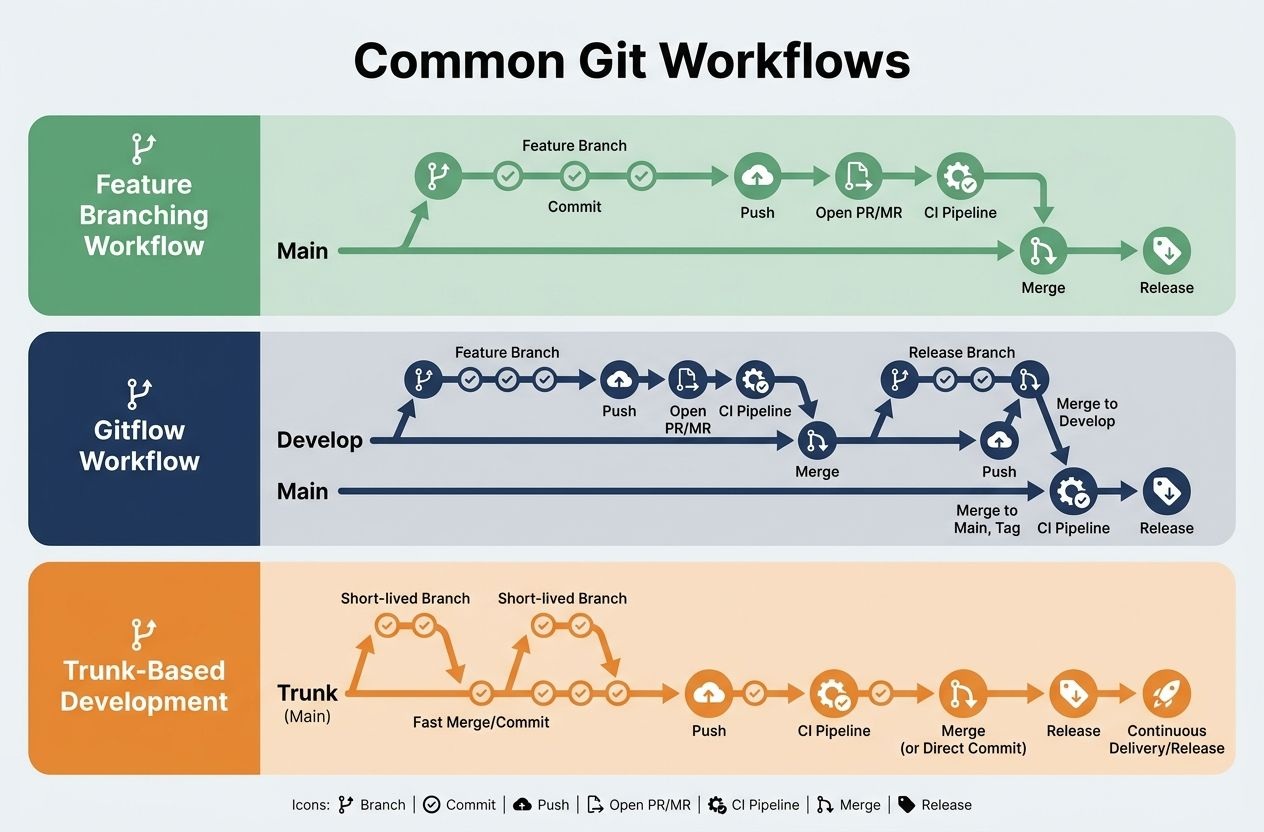
Workflows shape how teams collaborate. Choose one based on team size, release frequency and complexity:
Feature branching
Every new feature or bugfix lives in its own branch. This isolates work and simplifies code review.
Gitflow
Gitflow defines long-lived branches (master/main, develop) and short-lived branches (feature, release, hotfix). It’s structured and good for products with scheduled releases, though it can be heavyweight for fast-moving teams.
Trunk-based development
Developers integrate small changes frequently into a single long-lived branch (often called trunk or main). Works well with CI/CD and feature toggles, allowing continuous delivery.
Why adopt code versioning — benefits for teams and projects
- Accountability: Every change links to an author and message.
- Traceability: Reconstruct when and why bugs were introduced.
- Collaboration: Multiple devs can work concurrently using branches.
- Automation: Integrate tests, linting and deployment with CI/CD.
- Rollback: Revert to stable states quickly when incidents occur.
Comparing Git hosting platforms: GitHub, GitLab and Bitbucket
All three provide remote hosting for Git repositories, code review tools, and CI/CD integrations. Choose based on features, pricing, governance needs and ecosystem.
GitHub
GitHub is the largest code hosting platform with a massive open-source community. Strengths:
- Excellent social coding features: stars, forks and a huge public repository index.
- GitHub Actions: integrated CI/CD with a large marketplace of actions.
- Strong integrations with many tools and cloud providers.
- Great documentation and community resources (see GitHub Docs).
GitLab
GitLab focuses on a single application lifecycle platform. Strengths:
- Built-in CI/CD pipelines with advanced features in core product.
- Complete DevOps lifecycle: planning, SCM, CI, CD, monitoring and security.
- Self-managed or SaaS options — good for on-premises compliance needs (see GitLab).
Bitbucket
Bitbucket (Atlassian) integrates tightly with Jira and other Atlassian tools. Strengths:
- Strong integration with Jira for issue tracking and project management.
- Bitbucket Pipelines provide built-in CI/CD with simplified configuration.
- Good for teams already invested in the Atlassian ecosystem (see Bitbucket).
Side-by-side comparison (quick guide)
- Open-source community: GitHub leads.
- Integrated DevOps platform: GitLab offers the most end-to-end features out of the box.
- Enterprise/project management: Bitbucket integrates best with Jira and Confluence.
- Self-hosting: GitLab and Bitbucket Server support self-hosting; GitHub offers GitHub Enterprise.
Choosing the right platform — scenarios and recommendations
Ask these questions:
- Is open-source community exposure important?
- Do you need a single integrated DevOps suite?
- Is tight Jira integration necessary?
- Will you self-host due to compliance or security constraints?
Recommendations:
- If you want the largest community and rich marketplace: choose GitHub.
- If you want an all-in-one DevOps solution with easy self-hosting: choose GitLab.
- If your organization relies heavily on Atlassian tools: choose Bitbucket.
Common Git mistakes and how to fix them
1. Accidentally committed secrets
Problem: API keys or passwords accidentally committed. Solution:
- Rotate the secret immediately.
- Remove the secret from history with
git filter-repoorgit filter-branch(prefergit filter-repofor speed and safety). - Add secrets to
.gitignoreand use vaults for secret management.
2. Merge conflicts
Problem: Conflicts when merging branches. Solution:
- Use
git pull --rebaseto keep history linear (team agreement needed). - Open conflicting files, resolve the conflict markers, then
git addandgit rebase --continueorgit commit. - Use smaller, more frequent merges to reduce conflict surface.
3. Detached HEAD
Problem: You are on a commit rather than a branch. Solution:
- Create a branch from the current state:
git checkout -b my-branchorgit switch -c my-branch.
4. Lost commits
Problem: Commits seem to disappear after resets or rebases. Solution:
- Use
git reflogto find commit SHAs and recover them:git checkout -b restore <sha>.
5. Large files in repository
Problem: Repo grows large and slow. Solution:
- Use Git LFS to store large binaries outside the normal Git history.
- Rewrite history to remove large files if appropriate.
Best practices for teams
- Write clear commit messages: use imperative mood and reference issue IDs when relevant.
- Use code reviews (pull/merge requests) for quality and knowledge sharing.
- Automate testing and linting on CI to catch regressions early.
- Protect main branches with branch protections and required reviews.
- Document workflows in CONTRIBUTING.md and use templates for PRs/MRs.
Further reading and resources
- Pro Git book — authoritative, free resource.
- Git documentation — official docs and reference.
- GitHub Docs, GitLab and Bitbucket — platform-specific guides.
Conclusion
Adopting robust code versioning practices with Git empowers teams to collaborate safely, maintain history, and automate delivery. Choosing between GitHub, GitLab and Bitbucket depends on your priorities: community and integrations, integrated DevOps, or Atlassian alignment. Pair the right platform with team-aligned workflows and enforce best practices to maximize productivity.